
MatterLink Web
October 22, 2021 by Roger Bonine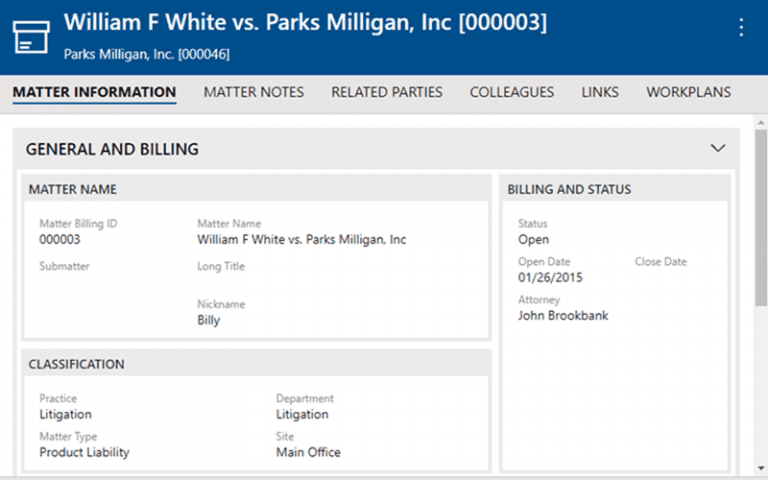
We are happy to announce that our newest product, MatterLink Web, will be available soon!
MatterLink Web is designed to provide access to the rich information in MatterLink and Docket Enterprise in an easy to use, responsive Web interface that can be accessed from any PC or tablet. Our first release will provide read-only access to client, matter, and schedule information, and is a great solution for attorneys and other legal professionals who want quick and easy access to the matter information that is most important to them.
Here are a few of the things that we think you’ll love about MatterLink Web.
Clean, easy-to-use interface
MatterLink Web has a simple, attractive interface that puts client, matter, and schedule information at your fingertips. Here is a matter list:

The icons on the right allow you to quickly select the matter dashboard (see below!), client, contacts, and schedule for this matter. Clicking on the matter name brings up a screen with all the other details for the matter. Each different information category is color-coded, so if you see a blue icon or heading, for example, you can think “matter”.

Matter and Personal Dashboards
MatterLink Web will open to a brand-new screen – My Dashboard – which will provide a nice overview of the next 14 days of docket data, along with recently accessed contacts and notes:

There is also a Matter Dashboard, which is accessible from any row of the matter selector:

Flexible views of schedule information
When viewing schedule items, there are several new options, such as an outline view:

It’s easy to toggle between outline and “flat” view, or row view and calendar view. Commonly used views such as My Schedule, Workgroup Schedule, and Court Schedule are also readily available, as are powerful filtering and sorting options.
Simple, powerful options for content sharing
- Every page in MatterLink Web has its own individual URL, which makes it easy to share a screen with colleagues. Just copy and paste the URL into an email or document, and – security permitting – your audience will see the exact screen that you are seeing. This makes it easier to share key information than ever before.
- Need to share important client or matter information on Teams or a Web portal? We have you covered. Every client, matter, or schedule detail screen in MatterLink Web has an alternate “report view” that is perfect for printing or hosting on external sites. We even have a special “Teams” view that uses the Teams colors and fonts for a seamless experience. Here is a sample client alternate view page, hosted as a dynamic Web page in Microsoft Teams:

Future Plans
We hope you enjoy MatterLink Web as much as we enjoyed working on it! Please contact us for more information.
Roger Bonine
Director of Software Development
July 22, 2021
Revised October 2021
